
DataGrid View
Extension » DataGrid View
DataGrid DetailView
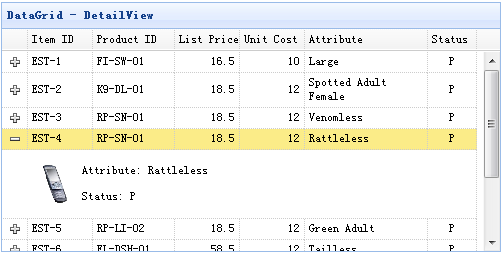
Step 1: Create an HTML Page
Step 2: Create the DataGrid
Properties
| Name | Type | Description | Default |
|---|---|---|---|
| autoUpdateDetail | boolean | Define if update the row detail content when update a row. | true |
| detailFormatter | function(index,row) | The formatter function to return row detail content. |
Events
| Name | Parameters | Description |
|---|---|---|
| onExpandRow | index,row | Fires when expand a row. |
| onCollapseRow | index,row | Fires when collapse a row. |
Methods
| Name | Parameter | Description |
|---|---|---|
| fixDetailRowHeight | index | Fix the detail row height. |
| getExpander | index | Get row expander object. |
| getRowDetail | index | Get row detail container. |
| expandRow | index | Expand a row. |
| collapseRow | index | Collapse a row. |
| subgrid | conf |
Create a nested subgrid. The 'conf' parameter has 'options' and 'subgrid' properties. 1) options: defines how the datagrid is rendered. The subgrid's options object has a 'foreignField' property. The foregin value will be sent to server to retrieve the subgrid's data. 2) subgrid: defines if the subgrid should be created. When defined, the nested subgrid will be created. Usage example:
var conf = {
	options:{
		//the master grid options
	},
	subgrid:{
		options:{
			foreignField:'orderid',	// the foregin field name
			//foreignField:function(prow){
			//	return {
			//		orderid: prow.id,
			//		ordername: prow.name
			//	}
			//}

			//other grid options
		},
		subgrid:{
			options:{
				foreignField:...,
				//other grid options
			}
		}
	}
};
$('#dg').datagrid().datagrid('subgrid', conf);
|
| getSelfGrid | none | Get the self datagrid object. |
| getParentGrid | none | Get the parent datagrid object. |
| getParentRowIndex | none | Get the parent row index. |
DataGrid GroupView
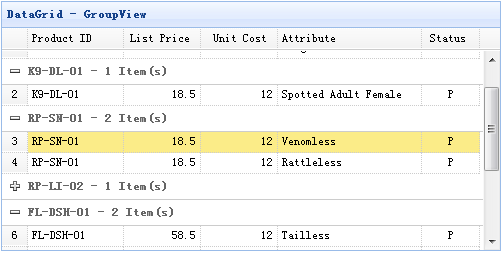
Step 1: Create an HTML Page
Step 2: Create the DataGrid
Properties
| Name | Type | Description | Default |
|---|---|---|---|
| groupField | string | Indicate what field to be grouped. | |
| groupSortOrder | string | Indicate the sort order on group field. Available values are: 'asc','desc'. | null |
| groupSorter | string | Customized sorting function. | |
| groupFormatter | function(value,rows) |
The formatter function to return the group content. The value parameter indicate the group value defined by 'groupField' property. The rows parameter indicate the data rows according to the specified group value. |
|
| groupFooter | function(value,rows) | The function to return the group footer row. | |
| groupStyler | function(value,rows) |
The function to return the CSS style for the group. The value parameter indicate the group value defined by 'groupField' property. The rows parameter indicate the data rows according to the specified group value. Usage example:
$('#dg').datagrid({
	groupStyler: function(value,rows){
		if (value == 'RP-LI-02'){
			return 'background-color:#6293BB;color:#fff;'; // return inline style
			// the function can return predefined css class and inline style
			// return {class:'r1', style:{'color:#fff'}};
		}
	}
});
|
|
| detailFormatter | function(index,row) | The formatter function to return row detail content. |
Events
| Name | Parameters | Description |
|---|---|---|
| onExpandGroup | groupIndex | Fires when expand a group. |
| onCollapseGroup | groupIndex | Fires when collapse a group. |
Methods
| Name | Parameter | Description |
|---|---|---|
| expandGroup | groupIndex | Expand a group. |
| collapseGroup | groupIndex | Collapse a group. |
| scrollToGroup | groupIndex | scroll to a group. |
| refreshGroupTitle | groupIndex | Refresh the group title. |
DataGrid BufferView
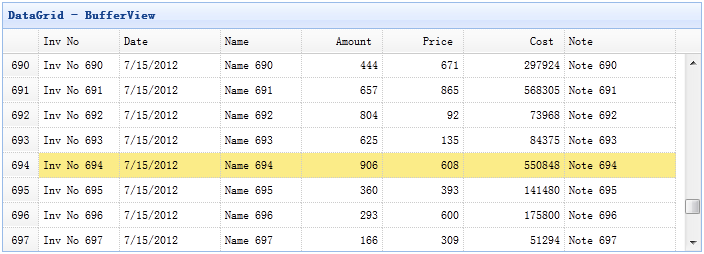
Step 1: Include bufferview javascript file
Step 2: Create DataGrid
DataGrid VirtualScrollView
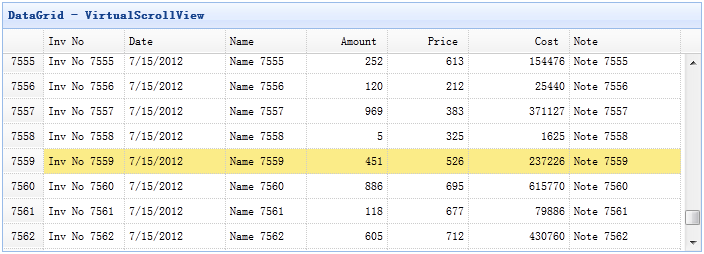
Step 1: Include scrollview javascript file
Create DataGrid with Virtual Scroll View
Methods
| Name | Parameter | Description |
|---|---|---|
| getRow | index | Get the specified row data. |
| gotoPage | page |
Go to the specified page.
Code example:
$('#dg').datagrid('gotoPage', 8);  // go to the page 8
$('#dg').datagrid('gotoPage', {
	page: 12,
	callback: function(page){
		console.log('go to page: ' + page);
	}
});
|
| scrollTo | index |
Scroll the view to the specified row.
Code example:
$('#dg').datagrid('scrollTo', 200);  // scroll to the row 200
$('#dg').datagrid('scrollTo', {
	index: 120,
	callback: function(index){
		console.log('scroll to the row: ' + index);
	}
});
|
| fixDetailRowHeight | index | Fix the detail row height. |
| getExpander | index | Get row expander object. |
| getRowDetail | index | Get row detail container. |
| expandRow | index | Expand a row. |
| collapseRow | index | Collapse a row. |