
Build CRUD DataGrid with jQuery EasyUI
Tutorial » Build CRUD DataGrid with jQuery EasyUI
In the previous tutorial we create a crud application that using dialog component to create or edit user information. This tutorial will show you how to create a crud datagrid. We will use the editable datagrid plugin to make these crud actions work.
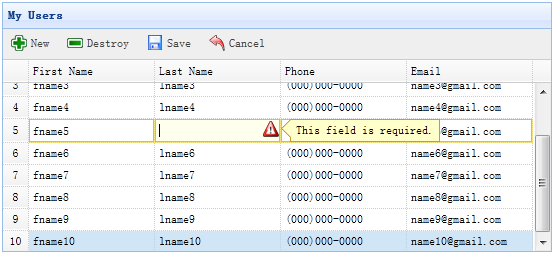
Step 1: Define DataGrid in HTML tag
Step 2: Make an editable DataGrid
We should provide the 'url','saveUrl','updateUrl' and 'destroyUrl' properties for editable datagrid:
- url: to retrieve user data from server.
- saveUrl: to save a new user data.
- updateUrl: to update an exists user data.
- destroyUrl: to destroy an exists user data.
Step 3: Write server processing code
Save a new user(save_user.php):
$firstname = $_REQUEST['firstname'];
$lastname = $_REQUEST['lastname'];
$phone = $_REQUEST['phone'];
$email = $_REQUEST['email'];
include 'conn.php';
$sql = "insert into users(firstname,lastname,phone,email) values('$firstname','$lastname','$phone','$email')";
@mysql_query($sql);
echo json_encode(array(
'id' => mysql_insert_id(),
'firstname' => $firstname,
'lastname' => $lastname,
'phone' => $phone,
'email' => $email
));
Update an exists user(update_user.php):
$id = intval($_REQUEST['id']); $firstname = $_REQUEST['firstname']; $lastname = $_REQUEST['lastname']; $phone = $_REQUEST['phone']; $email = $_REQUEST['email']; include 'conn.php'; $sql = "update users set firstname='$firstname',lastname='$lastname',phone='$phone',email='$email' where id=$id"; @mysql_query($sql); echo json_encode(array( 'id' => $id, 'firstname' => $firstname, 'lastname' => $lastname, 'phone' => $phone, 'email' => $email ));
Destroy an exists user(destroy_user.php):
$id = intval($_REQUEST['id']);
include 'conn.php';
$sql = "delete from users where id=$id";
@mysql_query($sql);
echo json_encode(array('success'=>true));